
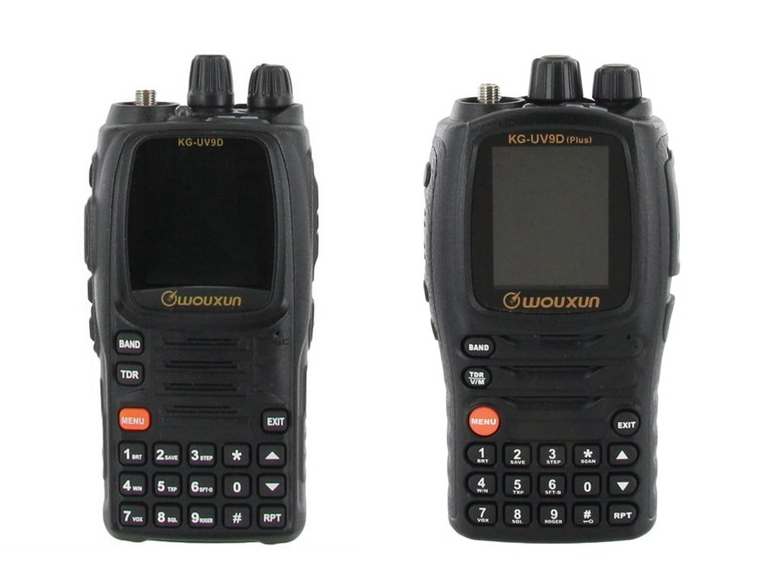
 The Wouxun KG-UV9D and KG-UV9D Plus are very similar in operation, except the Plus has the added functionality of cross band repeat. To accommodate this new feature, the 9D Plus has an additional 6 items listed in its menu for a total of 61 items, in contrast to the 55 menu items in the regular 9D.
There is one catch. The KG-UV9D Plus does not currently ship with its own user manual. Instead, Wouxun put the regular 9D manual in the box. This means the six new menu items included with the 9D Plus are not listed or explained in the manual included with the radio.
When we first received the KG-UV9D Plus at Buy Two Way Radios, it threw us off a bit, and we knew this could be confusing for our customers as well. So, we contacted Wouxun and requested instructions for these additional items. They are listed in the chart below. Default values are bold.
| Menu # | Name | Option | Values | Description |
|---|---|---|---|---|
| 41 | BLCDSW | Backlight Standby Switch |
ON/OFF | Controls the backlight when in standby (default is only little backlight for viewing the display screen) |
| 42 | BLEDSW | Backlight Prompt Switch |
ON/OFF | Indicates the radio is on when the backlight is off in standby (green LED light flashes every 5 seconds when the backlight is completely off) |
| 43 | TYPE-SET | Repeat Setting |
TALKIE DIR-RPT TW-RPT |
Selects whether the radio is in Transceiver Mode, Directional Cross-Band Repeat, or Two-way Cross-Band Repeat |
44 | RPT-SPK | Repeat Speaker |
ON/OFF | Select whether to open the speaker when there is audio received on the repeating receiver. |
45 | RPT-PTT | Repeat PTT | ON/OFF | Select whether using PTT to transmit out when repeating. The repeating signal is interrupted while PTT transmits. |
46 | RPT-KPT | Repeat Hold Time |
OFF/100-5000 300 |
When the signal disappears from the receiver, the user continues transmitting for a while when waiting for response within the valid hold time. If there is no more signal detected, it stops transmitting within the valid hold time. |
The chart below lists the menu items of the KG-UV9D and the KG-UV9D Plus in order. To access the menu in each radio, press the MENU button nd use the UP and DOWN buttons to navigate to the desired menu option or enter the number of the corresponding menu item into the keypad.
| Menu # | KG-UV9D | Description | KG-UV9D Plus | Description |
|---|---|---|---|---|
| 01 | ABR:s | ➜ | ABR:s | Auto Backlight Time |
| 02 | SAVE | ➜ | SAVE | Power Save Mode |
| 03 | STEP | ➜ | STEP | Step Frequency |
| 04 | W/N | ➜ | W/N | Bandwidth Selection |
| 05 | TXP | ➜ | TXP | Transmit Power Selection |
| 06 | SFT-D | ➜ | SFT-D | Frequency Shift Direction |
| 07 | VOX | ➜ | VOX | VOX |
| 08 | SQL-LE | ➜ | SQL-LE | Squelch Level |
| 09 | ROGER | ➜ | ROGER | Begin/End Transmit Prompt |
| 10 | TOT:s | ➜ | TOT:s | Timeout Timer |
| 11 | TOA:s | ➜ | TOA:s | Transmit Overtime Alarm |
| 12 | VOICE-SW | ➜ | VOICE-SW | Voice Switch |
| 13 | BEEP | ➜ | BEEP | Beep Prompt |
| 14 | MENULANGE | ➜ | MENULANGE | Menu Language |
| 15 | BCL | ➜ | BCL | Busy Channel Lockout |
| 16 | Rx-CTC | ➜ | Rx-CTC | Receiving CTCSS |
| 17 | Tx-CTC | ➜ | Tx-CTC | Transmitting CTCSS |
| 18 | Rx-DCS | ➜ | Rx-DCS | Receiving DCS |
| 19 | Tx-DCS | ➜ | Tx-DCS | Transmitting DCS |
| 20 | SC-REV | ➜ | SC-REV | Scan Mode |
| 21 | SP-MUTE | ➜ | SP-MUTE | Mute Settings |
| 22 | DTMF-ST | ➜ | DTMF-ST | DTMF Sidetone Settings |
| 23 | PTT_ID | ➜ | PTT_ID | Caller ID Transmission Mode |
| 24 | ID-EDIT | ➜ | ID-EDIT | Editing Caller ID |
| 25 | ID-DLY:ms | ➜ | ID-DLY:ms | Caller ID TX Delay |
| 26 | RING:s | ➜ | RING:s | Ring Time |
| 27 | ABR-LV | ➜ | ABR-LV | Backlight Selection |
| 28 | OFFSET | ➜ | OFFSET | Offset Frequency |
| 29 | CH-NAME | ➜ | CH-NAME | Channel Name Edit |
| 30 | MEM-CH | ➜ | MEM-CH | Channel Memory |
| 31 | DEL-CH | ➜ | DEL-CH | Channel Delete |
| 32 | PRI-CH | ➜ | PRI-CH | Priority Channel |
| 33 | PRI-SCN | ➜ | PRI-SCN | Priority Channel Scan |
| 34 | AUTOLOCK | ➜ | AUTOLOCK | Keypad Auto Lock |
| 35 | LOCKMODE | ➜ | LOCKMODE | Keypad Lock Mode |
| 36 | S-TONE | ➜ | S-TONE | Single Tone |
| 37 | VOX-DLY:s | ➜ | VOX-DLY:s | VOX Delay |
| 38 | SC-QT | ➜ | SC-QT | Saving Scan Mode |
| 39 | APO-TMR | ➜ | APO-TMR | Auto Power Off |
| 40 | PONMSG | ➜ | PONMSG | Power On Message |
| 41 | RPT-RCT | Repeater Receipt Tone | BLCDSW | Backlight Standby Switch |
| 42 | SCN-ADD | Scan Add | BLEDSW | Backlight Prompt Switch |
| 43 | SCN-GP | Scan Channel Group NO. | TYPE-SET | Repeat Setting | 44 | SCN-MODE | Scan Mode | RPT-SPK | Repeat Speaker | 45 | SCN-CD | CTCSS/DCS Scanning | RPT-PTT | Repeat PTT | 46 | CALL-ID | Call Group ID | RPT-KPT | Repeat Hold Time | 47 | AUTO-AM | Auto AM | RPT-RCT | Repeater Receipt Tone | 48 | AM-SW | AM Switch | SCAN-ADD | Scan Add | 49 | PF1-DEF | PF1 Function Program | SCN-GP | Scan Channel Group NO. | 50 | PF2-DEF | PF2 Function Program | SCN-MODE | Scan Mode | 51 | PF3-DEF | PF3 Function Program | SCAN-CD | Repeat PTT | 52 | VOLTAGE | Voltage Check | CALL-ID | Call Group ID | 53 | QT-SW | CTCSS/DCS Scan Determine Switch |
AUTO-AM | Auto AM | 54 | S-MUTE | Sub-Frequency Mute | AM-SW | AM Switch | 55 | RESET | Reset Setting | PF1-DEF | PF1 Function Program | 56 | - | - | PF2-DEF | PF2 Function Program | 57 | - | - | PF3-DEF | PF3 Function Program | 58 | - | - | VOLTAGE | Voltage Check | 59 | - | - | QT-SW | CTCSS/DCS Scan Determine Switch |
60 | - | - | S-MUTE | Sub-Frequency Mute | 61 | - | - | RESET | Reset Setting |
Additional resources:
Announcing the new Wouxun KG-UV9D (Plus) Limited Edition!
TWRS-89 - The New Wouxun KG-UV9D Multi-Band Radio
Wouxun KG-UV9D Plus Limited Edition unboxing video
How to set up cross band repeat on the Wouxun KG-UV9D Plus


Thanks again
I am in need of help trying to transmit to repeater frequencies. The radio for some reason only transmits simplex now. It did not do that before. I updated the RT systems program and I even tried using the actual Wouxon program specificaly for the KG-UV9P (plus) and I cannot get it back to where I had it where it would transmit to the repeater frequencies. I've even tried programing manually and i'm stuck. Never had this issue before.
How to do to scan between 2 frequencies saved on Wouxun KG-UV9D Plus?
Thanks
S/n:p12mp1681
My problem is:
Backlight display stays off. (Not ok, but has worked before)
Keyboard light goes on. (Ok)
I have done reset (61)
I have done 41 and 42..
No results, what do i have to do to get diplay light working again?
Answer here, but also mail please.
Thanks in advance
If so, the answer would be no. Although the KG-UV9D multi-band radio can receive on airband frequencies, it cannot transmit on them. In addition, if you are in the US, it is not FCC Part 87 type accepted for use as an avionics radio. There may be similar restrictions in other countries as well.
Thanks - Martin
I buy on your site the wouxun kg-uv9d plus limited edition
i m very happy with this product
i yould like to know how to expend the frequencies in TX because its bloced on USA version
thank you very much
laurent