
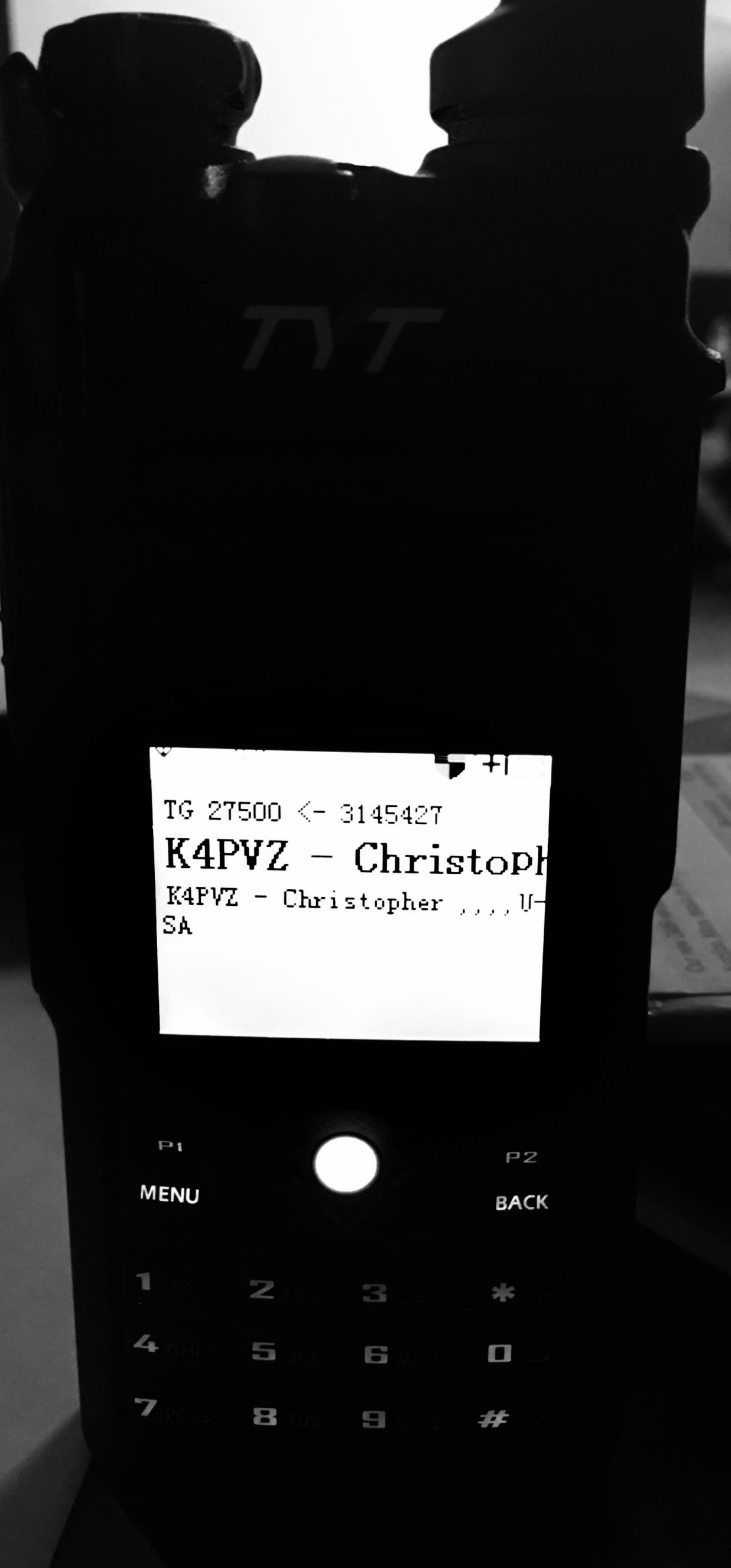
 As many of you may know, I work tirelessly with TYT directly to provide feedback to them (both my own and that of the end user) to enhance their products. I can honestly say it is an around-the-clock job. I spend many hours outside of normal day working with TYT to make their products the best in the Chinese market. I was the one who had them re-work the programming software for the MD-2017 and MD-9600 so they could be used with your pre-existing code plugs. This has been a game changer as far as I am concerned. So, let me jump off my soap box now...
When the MD-2017 was released, my biggest concern was the lack of storage in the radio for contacts. For most folks, 10,000 contacts is more than enough; however, I am a firm believer in the old saying that bigger is better.
From my feedback, TYT recently released a firmware upgrade for the MD-2017 to allow up to 100,000 contacts! However, in order to accomplish this, the recorder option had to go away. I was not a fan of the recorder anyhow. It was a neat concept on paper, but a useless function on the radio- kind of like a flashlight or a wrist strap.
Want to add up to 100,000 contacts into your TYT MD-2017 dual band DMR digital radio? Here's how to do it.
What you need:
- TYT MD-2017 dual band radio
- Firmware V3.33 bin
- V1.17 programming software
- Firmware launcher/installer
- Programming cable
Note: Microsoft Excel is currently required to be installed on the PC for the import of contacts to work.
Step 1: Save the correct firmware version to your desktop. In the case of the early release radios, it is V3.33 bin (non GPS)
Step 2: Double click on the "FirmwareDownloadV3.04_EN.exe" link
Step 3: Under the "User Program" section, click on "Open file upgrade". This is where you will find the file you saved to your desktop.
Step 4: Plug the programming cable in to your radio and the USB in to your computer. With the radio powered off, hold down the PTT and orange button and power the radio on. The screen will remain black but the LED light on top will flash red and green. You are now in firmware update mode.
Step 5: Write the firmware to the radio. To do this, click on the "Download file of upgrade" button. Your radio will now begin to receive the updated firmware. Once the download is complete, power the radio off and unplug the cable from the radio.
Step 6: Open the V1.17 software and plug the cable back into the radio. If you have a current code plug, the contacts that are in that will remain. This is important for your talkgroups.
Step 7: Click on the "Program" dropdown and select "Write contacts". A box will open with available buttons "Read, Write, Export, Import, and Cancel".
Step 8: If you already have a list, you will want to click the "Import" button. After you do this, select the list and import it to the software. The only notification you will get is if it was successful or not. You will not see these in your regular contact list.
Step 9: Once you get the notification that the import was successful, you will now want to power the radio on and hit the "Write button". The process will now begin. Upload times depend on the number of contacts. With the 64,000+ contacts I uploaded, it took about 5 minutes. Be patient and do not power the radio off!
Step 10: Once the download is complete, power the radio off and then back on again. Next is the most important step: You will need to go into your menu for the radio, click > utilities > radio settings > ContactsCSV, and turn it on.
Now your radio should be good to go! I think there are a few little things I would like for TYT to fix, but for the most part this is pretty awesome!! I like the display on it. It has the look of a pretty well-known firmware hack from the MD-380 days.
I installed this on my MD-2017 a few weeks ago and have been using it ever since. I also released my csv file containing over 64,000 contacts.
As always, my sales staff and I appreciate each and every one of our customers. We will continue to support you and the products we sell!
73,
Anthony R.
Sales Manager
www.buytwowayradios.com
contacts available? if so I can see that being super helpful if its doable.
The "manual" tells how to change display language, but I need to know exactly how many up and down movements to make because now that it is in Chinese it is impossible to know how to get into Utilities/Radio Settings/Language Selection.
Can anyone put the exact up/down and Select that is needed to get to language selection?
After connecting the TYT MD 2017 to the PC, and loading the CSP 2017 1.22 program,and the Firmware 3.04 the screen is white.
I could not update the firmware 3.04 only available on the OPEN-DMR website. after several attempts the screen is always white.
I do not know if the problem is software or hardware.
Is there a software solution? or should the TX be returned to the manufacturer for a firmware update?
thank you
F1BQS
So I recently bought a MD-UV390 and had issues with it communication with my computer for programming, was receiving the "wrong model" error, I'm new to this radio thing, I went on the TYT website and upgraded the firmware, that totally screwed my radio up, all the text and icons are not readable. Can I factory reset it? if so how? any ideas? My radio had a firmware of D016.006 and CPS v01.07. I appreciate the help.
Tom
00204003 92 17 00 ff 47 4a 37 4c 4a 4a 00 ff ff ff ff ff |....GJ7LJJ......|
00204013 ff ff ff ff 4e 69 67 65 6c 20 2c 2c 2c 2c 55 6e |....Nigel ,,,,Un|
00204023 69 74 65 64 20 4b 69 6e 67 64 6f 6d 00 ff ff ff |ited Kingdom....|
00204033 ff ff ff ff ff ff ff ff ff ff ff ff ff ff ff ff |................|
*
00204073 ff ff ff ff ff ff ff ff 0c ad 00 ff 47 57 31 53 |............GW1S|
00204083 59 47 00 ff ff ff ff ff ff ff ff ff 41 6e 64 79 |YG..........Andy|
00204093 20 2c 2c 44 65 65 73 69 64 65 2c 2c 55 6e 69 74 | ,,Deeside,,Unit|
002040a3 65 64 20 4b 69 6e 67 64 6f 6d 00 ff ff ff ff ff |ed Kingdom......|
002040b3 ff ff ff ff ff ff ff ff ff ff ff ff ff ff ff ff |................|
*
002040f3 51 e0 10 ff 4b 4b 36 59 4c 57 00 ff ff ff ff ff |Q...KK6YLW......|
00204103 ff ff ff ff 52 6f 62 65 72 74 20 4c 20 47 61 72 |....Robert L Gar|
00204113 76 69 6e 2c 2c 43 68 75 6c 61 20 56 69 73 74 61 |vin,,Chula Vista|
00204123 2c 43 61 6c 69 66 6f 72 6e 69 61 2c 55 6e 69 74 |,California,Unit|
00204133 65 64 20 53 74 61 74 65 73 00 ff ff ff ff ff ff |ed States.......|
00204143 ff ff ff ff ff ff ff ff ff ff ff ff ff ff ff ff |................|
I'm working on my own utility to configure MD-UV380 and other models. Seems like it's possible to update the contacts table without the need for official CPS (and have Microsoft Office installed).
Your file 65000newcontacts.csv contains 64996 records. Is it coincidental, or there is a limit of 65535 records or something?
Step 4: Plug the programming cable in to your radio and the USB in to your computer. With the radio powered off, hold down the PTT and orange button and power the radio on. The screen will remain black but the LED light on top will flash red and green. You are now in firmware update mode.
I am wondering if loading too many contacts hits memory where bitmapped characters reside?
Jason
Please learn to write if your language is english...
Software does not work on 64 bit Windows 10 home ...
So pulled out the old 32bit Windows XP laptop
Software works fine. Was able to upgrade firmware however, when attempting ti upload contact list I get the Imfamous "Excel fail" error.
Laptop has office 2002 which includes Excel.
Csv file had all the proper columns, downloaded your csv as well.
Only issue is Excel 2002 has a limit as to how many rows.
So why does the software not detect Excel? I'm I missing a step?
Tnx
Mike
It seems that if I use the menu turn off the CSV list, then Tx displays my information from basic settings -- but of course, then just displays ID numbers for Rx since I only have 7 "contacts" in the regular list (the Mi5 talk groups and a "Simplex" group).
Turn on the CSV list, and now Rx displays information, but fails on Tx (even though I can confirm that I'm in the CSV when looking up by number).
It took me a while to figure out the sequence since I'd only received the MD2017 a few days ago and have been going back and forth on contacts and code plug and depending upon what I write affected which Tx display I received.
As you're in touch with the TYT manufacturing site, here are some requests from the field:
1) Ability to change the displayed DATE format on the screen.
2) Ability to disable the display of the TIME and/or DATE on the screen, either in the CPS or the Utilities menu.
3) Ability to disable the second bank (otherwise shown as DISABLED), either in the CPS or the Utilities menu.
4) Change the screen font size to allow display of more characters without having to wait for the screen scroll.
Thanks.
David/KB1MSR
I could then download from radio and see my channels and zones, etc .Then I went and downloaded current code plug/channels and nothing shows in the program but are in the radio?? I was going to add more frequencies. So why can't I see whats in the radio to add further info?
I'm lost...Could you help? Tnx es 73
Is there any way that TYT could please remove this requirement?