
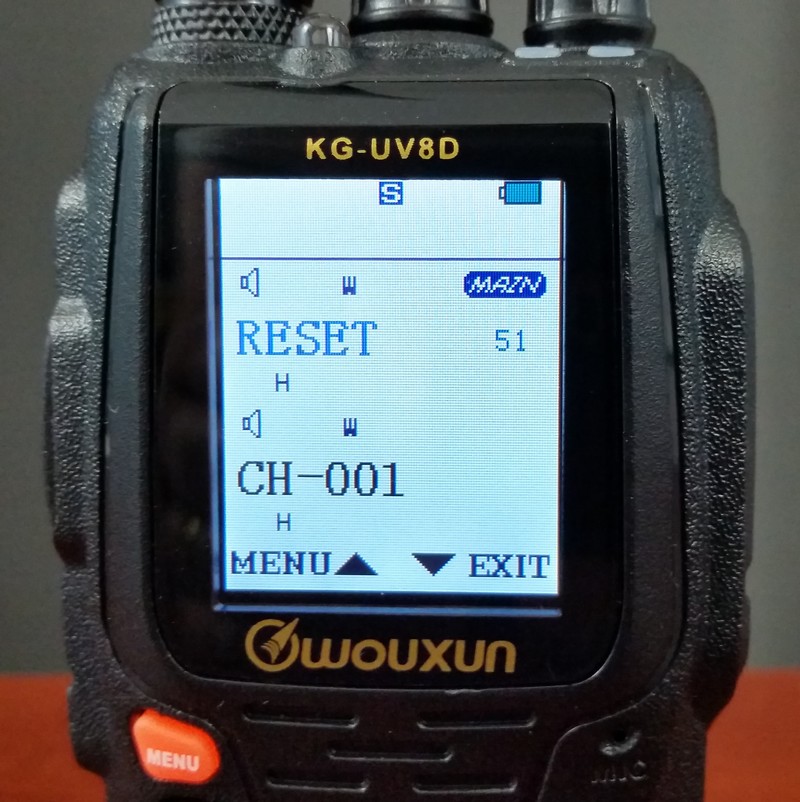
 The Wouxun KG-UV8D two way radio has a quick and easy reset. The only downside to the reset operation is it also clears out all the language settings and sets them to the default. English is its second language. The default is Chinese. The reset process clears all the language settings, both voice prompts and menu items shown on the display. If you speak and read Chinese, that's not an issue. If English is your first or only language, fear not, we're here to help. if you can read this, follow the instructions below and post-reset navigation should not be a challenge.
There are two reset options.
Functional Parameter Reset (VFO)
the VFO option resets the function settings to factory defaults without wiping out the channel settings.
Total Parameter Reset (ALL)
The ALL option performs a full reset back to factory defaults and clears the channel settings.
Follow the steps below to reset a Wouxun KG-UV8D, KG-UV8D Plus, or KG-UV8E two way radio from Buy Two Way Radios to its original factory settings and English prompts.
To perform a VFO Reset
1. Turn on the radio and press the MENU button.
2. Press the UP and DOWN arrow key to select RESET (Menu Item 51).
3. Press MENU to choose RESET.
4. Press the UP/DOWN arrow keys to choose VFO.
5. Press MENU. The radio will display RESET SURE?
6. Press MENU to confirm. The radio will display Waite please (yes, "wait" with an "e") for a few seconds, then shut down and restart.
7. The radio will revert to Chinese language mode. Reset is complete.
To perform a FULL Reset
1. Turn on the radio and press the MENU button.
2. Press the UP and DOWN arrow key to select RESET (Menu Item 51).
3. Press MENU to choose RESET.
4. Press the DOWN arrow key to choose ALL.
5. Press MENU. The radio will display RESET SURE?
6. Press MENU to confirm. The radio will display Waite please for a few seconds, then shut down and restart.
7. The radio will revert to Chinese language mode. Reset is complete.
To set language from Chinese to English
1. Press MENU.
2. Press the UP and DOWN arrow key to select LANGUAGE (Menu Item 12). Note: the menu will be in Chinese, so the next two steps are important if you cannot read Chinese characters.
3. Press MENU.
4. Press the DOWN arrow key once.
5. Press MENU.
6. Press EXIT.
A reset may resolve many issues or malfunctions, but may not work for every scenario. However, it is usually a recommended first step when troubleshooting a two way radio.
I thought I would have to send this back. Not sure why Radio 1 is even an option. It has no features!
Hopefully will never need to do a "factory reset" !!
Ronnie AI7DK.
The only problem was unused channels in Chirp would not be deleted when uploading, so you end up with a mishmash of previous and your channels.
I thought I'd do a Factory reset VFO / All (menu 61) to clear everything out and just re upload my channels to the radio.
********** BIG MISTAKE ***********
Not only does "Factory Reset" not actually clear everything out (some settings, incl display message etc. stay preserved).
It also castrates the radio into "model 1" mode which doesn't allow switching to channel mode or switching bands. Easily solved thanks to forums like this one: turn off, and hold 2 key while turning on again. Radio goes into "Model 2" mode. ie back to what you bought it for.
But much worse than that is the fact that you can no longer select the channels you program w chirp - or at least you only select a random subset (sometimes just ch 1 and ch 2) Despite no errors during the upload and the fact that other settings as well as the actual names & frequencies of channels 1 and 2 get changed without errors, the radio refuses to allow access to other channels (in channel mode, via up down keys, the rotation knob on top or numeric channel number entry ➟ none work.)
This is very strange behavior. Anybody else seeing this ? Unclear whether it is something on the chirp side, the wouxun side or the combination. Chirp seems to upload and change settings and channels just fine until the dreadful "Factory Reset" (Menu 61)....after that your 999 channel radio becomes a 2 channel radio.
ANY SUGGESTIONS?
THANKS BOB AF2DX
73 bob af2dx